Have you ever wondered how data moves so fast across the internet? It all comes down to the amazing cables hidden inside big computer rooms. One of the most important tools we use today is the mpo trunk cable. This special cord helps connect many devices at the exact same time without slowing down.
Think of this cable as a super-wide highway for your internet data. Instead of having just one lane for cars, it has many lanes packed into a single, slim tube. This clever design saves a lot of physical space in crowded rooms. It also makes setting up a giant network much easier for engineers.
In this complete guide, we will explore everything you need to know about these powerful fiber optic tools. We will look at how they work, why businesses love them, and how to pick the best one. Let us get started and learn together.
What Exactly is an MPO Trunk Cable
An mpo trunk cable is a high-performance fiber optic cable designed to carry massive amounts of data. The letters MPO stand for Multi-fiber Push On. This means you can plug the cable in quickly with a simple push, just like a regular home internet cord.
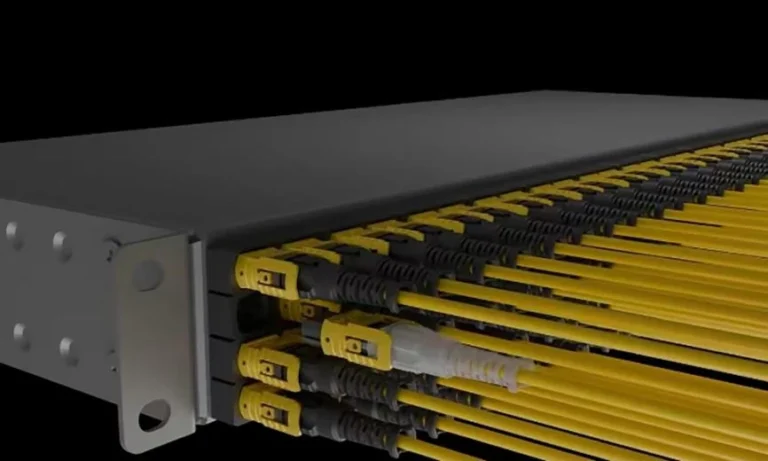
Inside this single jacket, you will find multiple individual glass fibers bundled tightly together. Most of these cables hold 12, 24, or even up to 96 fibers inside them. Instead of plugging in dozens of separate wires, a technician only has to plug in one single connector.
This smart technology is a total game-changer for modern businesses that need to move files instantly. It replaces messy piles of tangled wires with a clean, organized system. It is the ultimate backbone for any serious computer network.
Why Modern Data Centers Need These Fiber Cables
Data centers are the beating hearts of the modern digital world. They handle all our streaming videos, online games, and cloud photo backups every single second. Because of this non-stop traffic, these facilities require an mpo trunk cable to keep things running smoothly without lagging.
Old-fashioned copper wires are simply too slow and bulky to handle this much information today. Fiber optics use light beams to send data, which is the fastest speed possible in our universe. By using a multi-fiber setup, data centers can pack more power into a much smaller physical footprint.
Airflow is another big reason why these slim cables matter so much. When a computer room is stuffed with thick, messy wires, cool air cannot circulate well. These slim fiber assemblies keep the room cool, which saves energy and prevents expensive machines from overheating.
The Big Benefits of Going Modular with Fiber
Using an mpo trunk cable brings a lot of great advantages to any network project. First of all, it saves a massive amount of installation time. In the past, workers had to glue and polish every single fiber strand by hand, which took days.
Now, these cables come pre-terminated, which means they are put together perfectly at the factory. You just pull them out of the box and click them into place. This plug-and-play style reduces human mistakes and ensures the connection is completely flawless from day one.
These cables also make it very easy to grow your network in the future. If your business expands, you do not need to rip out all your old wiring. You can simply add another backbone line to boost your speed instantly.
Understanding Different Fiber Counts for Your Network
When shopping for an mpo trunk cable, you will notice they come in different fiber counts. The most common option you will see around is the 12-fiber version. This standard size is perfect for moving data at speeds of 10 or 40 gigabits per second.
For even bigger jobs, companies often choose the 24-fiber style. This type allows you to split the lanes into multiple streams for faster transmission. It is highly popular for upgrading networks to a blazing-fast 100-gigabit speed.
Choosing the right count depends entirely on how much data you plan to move today and tomorrow. It is usually a smart idea to buy more capacity than you currently need. This keeps your network ready for future technology upgrades.
Single Mode vs Multimode Which One is Best
It is very important to know that an mpo trunk cable comes in two main fiber types. The first type is called single-mode fiber, which usually has a yellow outer jacket. This style uses a laser to shoot light over very long distances, like between different buildings or cities.
The second type is called multimode fiber, which often has an aqua or pink jacket. This version uses LED lights to send data over shorter distances, usually inside the same room. Multimode is highly popular for indoor data centers because the equipment costs much less.
If you are building a local network inside an office, multimode is usually the best choice for your budget. If you need to connect two separate offices across town, single-mode is the way to go.
How to Handle and Install Fiber Safely
While an mpo trunk cable is incredibly strong on the outside, the glass strands inside are very delicate. You must follow a few simple rules during installation to keep them from breaking. First, never bend the cable too tightly around sharp corners.
Always keep the plastic dust caps on the connectors until the exact moment you plug them in. Even a tiny speck of dust can block the light beam and ruin your internet connection. We always say in the industry to clean every connection before you plug it in.
Finally, never look directly into the end of a live fiber cable. The laser light used to send data is invisible, but it can harm your eyes permanently. Safety should always come first when working with high-tech gear.
The Role of Polarity in Keeping Things Connected
Polarity might sound like a complicated science word, but it is actually a very simple concept. In any network, one fiber strand must send data, and another strand must receive it. An mpo trunk cable must manage these lanes correctly so the signals do not crash.
There are three main types of polarity wiring methods, known simply as Method A, Method B, and Method C. Method A keeps the wires straight from end to end. Method B flips the wires so the signals cross over correctly to the right ports.
Method C pairs up the wires and twists them in a specific way for special equipment. You must make sure all your cables and connectors use the exact same method. If you mix them up, your devices will not be able to talk to each other.
How to Clean and Maintain Your Fiber Connections
Taking good care of your mpo trunk cable will ensure it lasts for many years to come. The most important tool you can own is a specialized fiber optic cleaning pen. This handy tool uses a dry cloth to wipe away oils and dirt with a quick click.
Never use your shirt or a regular tissue to clean the tips of the glass fibers. These materials leave behind tiny scratches and lint that will degrade your signal speed. If a connection seems slow, unplug it and give it a clean wipe.
It is also a smart practice to inspect your lines with a fiber scope tool regularly. This camera lets you see the tiny glass surface up close on a screen. Keeping things clean is the cheapest way to avoid network downtime.
Future Proofing Your Business with High Speed Links
Technology changes at a lightning-fast pace every single year. Apps get bigger, files get heavier, and we all use more data than ever before. Installing an mpo trunk cable today ensures your business is fully prepared for this digital future.
These advanced lines are built to support future speeds up to 400 gigabits per second and even higher. By putting this infrastructure in place now, you will save a lot of money down the road. You will not have to replace your wiring when fast new tools arrive.
Think of it as an investment in peace of mind for your team. Your staff will enjoy steady connections, and your customers will never experience annoying delays. It is a win for everyone involved.
Frequently Asked Questions
Can I connect an MPO trunk cable directly to a regular switch?
No, you usually cannot plug it directly into a standard network switch port. You will need a special cassette or a breakout harness cable to split the big bundle into individual lines.
What is the difference between MPO and MTP connectors?
MTP is a brand name for a high-quality version of an MPO connector. They work the exact same way and can plug into each other without any compatibility issues.
How long can an MPO trunk cable run without losing signal?
Multimode versions can easily travel up to 300 meters inside a building. Single-mode versions can travel for several kilometers without needing a signal booster.
Are these high speed cables waterproof?
Standard indoor cables are not waterproof and should stay dry. If you need to run them outside or underground, you must buy a special outdoor-rated jacket.
Why is my new cable not showing any signal at all?
The most common cause is a dirty connector or a mismatch in the polarity method. Try cleaning the ends carefully and verify that your equipment settings match.
Can I repair a broken fiber strand inside the cable bundle?
It is very difficult to fix a single broken strand inside a tight bundle. In most cases, it is much safer and cheaper to replace the entire cord.
Final Thoughts on Upgrading Your Data Network
Choosing the right mpo trunk cable is one of the smartest moves you can make for your network. It clears out messy clutter, boosts your data speeds, and keeps your system ready for future tech. By understanding how they work, you can make the best choice for your company. Do you have any questions about planning your next big fiber project? Let us know how we can help you build a faster tomorrow.